How to Activate Roaming Globe Prepaid SIM Full Guide 2025

Traveling abroad is exciting, but staying connected with family and work is equally important. Many Filipinos use Globe because of its wide coverage and affordable services. One of the most common questions asked by prepaid users is how to activate roaming Globe prepaid SIM.
About Globe Roaming for Prepaid Users
Globe Telecom provides international roaming services for both postpaid and prepaid subscribers. With roaming, you can use your SIM card in over 200 countries and territories. The great news is that prepaid subscribers do not need to worry about complicated processes. In most cases, roaming works automatically once you land in another country. However, knowing exactly how to activate roaming Globe prepaid SIM ensures a smooth and stress-free travel experience. especially if you want to compare it with options like Smart e SIM, which also offers international roaming solutions.
| Feature | Details |
|---|---|
| Service Type | Globe Prepaid International Roaming |
| Activation Method | Automatic upon arrival or by sending ROAM ON to 333 |
| Supported Services | Calls, SMS, Mobile Data |
| Partner Networks | 200+ countries with roaming agreements |
| Extra Requirement | SIM must be active and have sufficient load or registered promo |
Automatic Activation of Globe Roaming
One of the easiest parts of traveling with Globe is that your roaming service is usually activated automatically. As soon as you arrive in a supported country and turn on your mobile phone, your SIM should connect to a partner network. In many cases, you can start calling, texting, or browsing right away. Still, to guarantee seamless service, it is good practice to know how to activate roaming Globe prepaid SIM manually in case automatic activation does not work. Keeping this backup method in mind can save you from stress while traveling.
Use “ROAM ON” to Ensure Roaming Is Enabled
If signal doesn’t come automatically or you just want confirmation, you can activate manually:
- Text: Send ROAM ON to 333.
- Alternative methods: Use GlobeOne app, dial *143#, or contact the Globe Roaming Hotline at (+632) 7730‑1212 (toll-free even while roaming).
Choose a Roaming Promo for Cost-Efficient Use
While roaming activates automatically, using data, calls, or texts can be expensive without a promo. You can register for more affordable roaming packages:
Via GlobeOne App
- Open the app
- Tap Shop → Buy Globe Prepaid promos
- Select Search by Country and choose the desired promo type (e.g. Roam Surf, GoRoam, etc.)
Via G Cash App
- Tap Load → Mobile → Roaming
- Select from available roaming promos
Manual Activation Through SMS
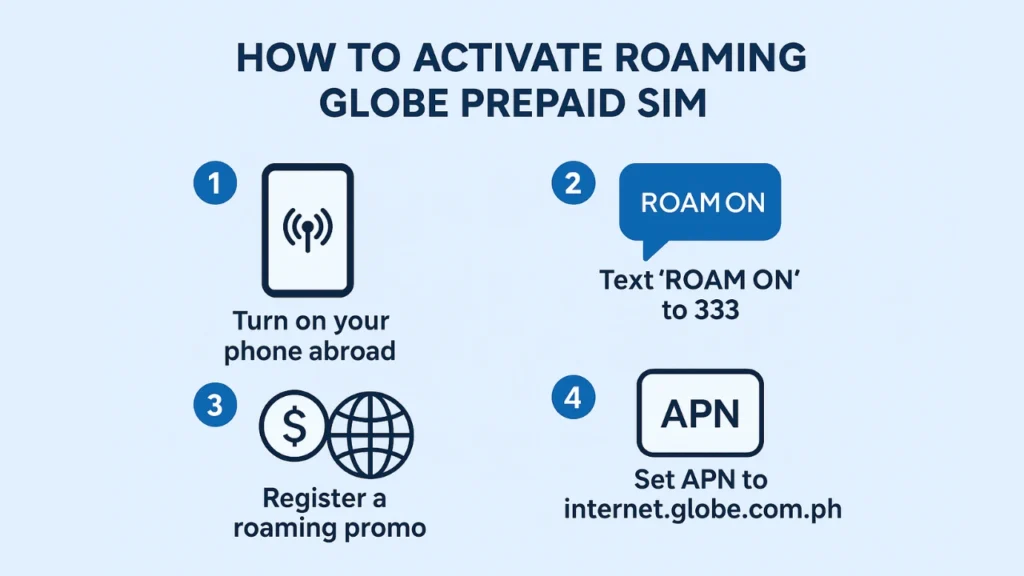
If you cannot get a signal or the roaming does not start automatically, Globe allows a simple manual activation. You only need to send a quick text message.
| Method | Action to Perform |
|---|---|
| SMS Activation | Text ROAM ON to 333 |
| Alternative Option | Dial *143# and look for the roaming menu |
| Support Hotline | Call Globe Roaming Hotline at +632 7730 1212 (toll-free abroad) |
By using these methods, your SIM should immediately connect to the available partner network. Once connected, you can start using your mobile services as usual.
How to Register for Roaming Promos?
Using roaming without promos can be very expensive. Globe understands this concern, which is why they offer different roaming packages. Knowing how to activate roaming Globe prepaid SIM also means knowing how to register for promos that fit your needs.
| Promo Type | Description |
|---|---|
| Roam Surf | Data bundles that give internet access for 1 to 3 days |
| GoRoam | Country-specific internet bundles with larger data allocation |
| Roam All Net | Call and text bundles for cheaper communication abroad |
| Roam Supersaver | Combination of data, calls, and texts at affordable daily rates |
These promos can be activated through the GlobeOne App, GCash App, or by texting specific promo keywords to 8080. For example, sending ROAM SURF 399 to 8080 activates a 3-day data promo. You can learn more about TmSIM at Tm Sim Registration.
Setting Up APN for Data Services
Sometimes, even after successful roaming activation, mobile data may not work correctly. To fix this, you need to check your Access Point Name (APN) settings.
| Setting Option | Value |
|---|---|
| APN | internet.globe.com.ph |
| Username | Leave blank |
| Password | Leave blank |
Once updated, restart your device to refresh the connection. This small adjustment ensures smooth browsing, video calls, and messaging while traveling.
Common Issues and Troubleshooting
Some prepaid users experience difficulty with roaming, especially when using newer devices like iPhone 12 or later. These issues may be related to LTE compatibility or SIM registration status.
| Issue | Reason | Solution |
|---|---|---|
| No signal abroad | Roaming not activated or poor coverage | Send ROAM ON to 333 or use manual network search |
| Mobile data not working | Wrong APN configuration | Set APN to internet.globe.com.ph |
| Cannot call or text | No active roaming promo or insufficient load | Load SIM and subscribe to roaming bundle |
| iPhone not connecting to LTE | Device compatibility issue | Switch to 3G first, then back to LTE |
Knowing these fixes helps you enjoy your trip without worrying about losing communication with your loved ones.
Customer Feedback on Globe Roaming
Most customers appreciate the convenience of automatic roaming. Many travelers mention that their SIM connects as soon as they turn on their phone at the airport. However, some still face minor issues, especially when using mobile data without setting up the correct APN. Overall, feedback is positive, especially when subscribers register for roaming promos before leaving the Philippines.
Advantages of Using Globe Roaming
Using Globe roaming services comes with several benefits. Travelers can stay connected without buying a local SIM immediately. They can also enjoy the comfort of using their existing number for banking, online accounts, and emergency contacts. This convenience is one of the main reasons why many prepaid subscribers ask how to activate roaming Globe prepaid SIM before traveling. With the help of tools like the GlobeOne App, it becomes even easier to manage roaming promos, check balances, and stay connected while abroad.
| Advantage | Explanation |
|---|---|
| Convenience | No need to buy a new SIM abroad |
| Security | Continue receiving OTPs for banking and online services |
| Flexibility | Choose from multiple roaming promos based on destination and usage |
| Accessibility | Service available in more than 200 countries |
Important Tips Before You Travel
Before flying out, make sure your SIM card is active and has enough load. It is also advisable to register for a roaming promo in advance through the GlobeOne app or GCash. If you travel frequently, consider promos that last for multiple days or allow data sharing. Following these tips ensures that you never lose connection even when abroad.
Conclusion
Staying connected abroad is easier than ever with Globe roaming services. Whether it is automatic activation or manual setup, knowing how to activate roaming Globe prepaid SIM guarantees a worry-free travel experience. You only need to send a simple text, adjust a few settings, and subscribe to the right promo. With proper preparation, you can enjoy seamless calls, texts, and internet access wherever you go.
By understanding the steps, promos, and troubleshooting methods, you can confidently use your Globe prepaid SIM in over 200 countries. The key is to activate roaming properly and register for the right package. This way, you stay connected with your family, friends, and work while enjoying your trip abroad.